AarhusJS: Arrays
2024-09-03

This is a simplified version of the presentation I gave at Systematic, September 3rd, 2024.
See also LinkedIn post by Gizem, and me.
The presented version can be found at github.
Some of you might remember the presentation I did at Whiteaway Group on December 7th, 2020 where we looked at the Canvas element - and hopefully inspired you to go deeper with graphics programming.
Aarhus JS posted a recording of it to youtube
In hindsight, the Canvas exploration took us down a path towards technologies (like
shaders, graphics cards, vector math) that's not usually in the realm of most javascript developers -
today, I hope we can do the same (!) with Arrays (!!)
Lets have a look at
how to use it(not included in this summary, see Array methods at MDN)js reference type(not included in this summary, see Writeup)- FAST what makes it fast
- LOWhow low-level arrays work (C, C++, Obj-C, Rust, Swift)
- JIThow js arrays work (with a peek at TurboFan)
- SNDwork with buffers (sound example)
- BLEwork with binary data (web-ble example)
EX.1 Lets continue where we left off, with a Canvas example:
You will (probably) observe that the sequential, (b) will fail to maintain 60 FPS, once the cell-size becomes less than 3 pixels - its the number of drawing operations to perform inside your frame-budget (see below) is simply too many.
Feel free to look at the source, but here's a snippet that shows how the "batch" operation, (c) computes (fast) new colors, stores them in a array (imageData.data)(fast), and then draws all of them in one go (slow).
const ctx = g.getContext("2d");

// b) sequential operation: draw each

const blockSize = 2; // value from the range-input
for (let y = 0; y < size.h; y += blockSize) {
  for (let x = 0; x < size.w; x += blockSize) {
    const color = (Math.random() * 255) << 0;
    ctx.fillStyle = `rgb(${color},${color},${color},1)`;
    ctx.fillRect(x, y, blockSize, blockSize);
  }
}

// vs

// c) batch operation: update the imageData array, then draw it

const imageData = ctx.createImageData(size.w, size.h);
for (let i = 0; i < imageData.data.length; i += 4) {
  const color = (Math.random() * 255) << 0;
  imageData.data[i + 0] = color;
  imageData.data[i + 1] = color;
  imageData.data[i + 2] = color;
  imageData.data[i + 3] = 255;
}
ctx.putImageData(imageData, 0, 0);
A note on "FPS" (Frames pr Second):
Given a second (1000 milliseconds), and a (ideal) framerate of 60, our "frame budget" (the time we can spend computing a frame) becomes 1000 / 60 = 16.67 ms
If you open your browser's Console, you will see that the Canvas' underlying imageData is logged - and we can inspect its contents - a Uint8ClampedArray containing 1742400 numbers.
It is arranged linearly, so
[0] = red value of the first pixel
[1] = green value of the first pixel
[2] = blue value of the first pixel
[3] = alpha value of the first pixel

[4] = red value of the 2nd pixel
[5] = green value of the 2nd pixel
[6] = blue value of the 2nd pixel
[7] = alpha value of the 2nd pixel
...
and so on with 4 indexes pr pixel.
This means that the 1742400 numbers represents 1742400/4 pixels, which is 435600.
Given a canvas width of 880 pixels, we know where to "wrap".
Oh, and about that
const color = (Math.random() * 255) << 0;
its a marginally faster alternative to
const color = Math.floor(Math.random() * 255);
Check JSBenchmark comparison here :)
Further reading: faster-canvas-pixel-manipulation-with-typed-arrays bitwise vs math.floor() performance
FAST Ok, so how come those arrays are so fast?
lets take a look at what makes arrays so fast - or rather:
how you can keep your arrays fast, with a bit of computer science
Performant arrays are arrays
- with no "holes" (
[1,2,3] vs [1, empty, 3]) - with same type (
[1,2,3] vs [1, "2", 3]) - of a size (length) that does not change (too often)
(3) Last point first:
Initialize your arrays with length, like so
const arr_a = []; // initialized without length
for (let i = 0; i < 100; i++) {
  arr_a[i] = i;
}
// here, the array needs to be re-sized each time you add an element to it
// thats slow.

// vs

const arr_b = new Array(100); // initialized with length
for (let i = 0; i < 100; i++) {
  arr_b[i] = i;
}
// but here, the array already have a size. fast.
// note: true for arrays shorter than 64.000 elements
(2) Use same element type
In low-level languages (e.g. C, C++, Obj-C, and Rust, Swift via their 'unsafe' mechanisms), arrays are declared with a fixed type, fixed size/length and stored in contiguous memory (a unbroken block of RAM).
// C++
uint8_t myArray[5] = {1, 2, 3, 4, 5}; // An initialized array
The type (uint8) (a data type that can represent any whole number from 0 to 255) by using 8 bits.
An array of 5 uint8's, will thereby have a length of 5 * 8 = 40 bits
A table with a 8-bits data type, storing the same myArray from above
| index | 0 | 1 | 2 | 3 | 4 |
| value | 1 | 2 | 3 | 4 | 5 |
| bits | 0000 0001 | 0000 0010 | 0000 0011 | 0000 0100 | 0000 0101 |
LOWhow low-level arrays work (C, C++, Obj-C, Rust, Swift)
In C, the variable myArray is a pointer to the memory
address of where this array begins
// C++
uint8_t myArray[5] = {1, 2, 3, 4, 5}; // An initialized array

uint8_t a = myArray[0];
// means "move to the memory address stored in the 'myArray' pointer, read 1 byte"

uint8_t a = \*myArray;
// equivalent, reading 1 byte from where the pointer, eh, points to

// --
// and, as the type (which equals the byte-size of an element) is known,

uint8_t b = myArray[1];
// means "move to the memory address stored in the 'myArray' pointer + 1byte, and read 1 byte"

uint8_t b = \*(myArray + 1); // (equivalent, using pointer arithmetics)
This gives us
- Constant time access
- Computable indexing
In JS, we dont usually need to worry much about this,
but that is only because modern Javascript engines (more on that later) helps us.
But, there is only so much they can do if you design your data badly...
// just because you can, doesn't mean you should...
const data = [
  1,
  true,
  0xfa,
  { name: "foo", score: 3.14, rate: 4321 }[(1, 2, "bar")],
];
(1) and lastly (no "holes"):
// Dense vs Holey
const arr = [1, 2, 3];
arr[9] = 4; // [1, 2, 3, empty × 6, 4]
Operations on Holey arrays are generally slower than Dense arrays,
because the engine needs to check that there is a value to read rather than just read it.
So?
So you might be wondering why should I care!?
Well, because if you know this, you can write code that the javascript engine can efficiently optimize.
V8 implements the above 3 rules in a lattice:
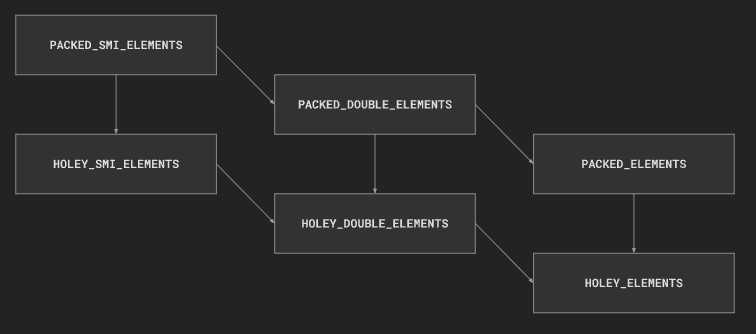
(simplified, only the most common elements kinds shown. See v8/src/objects/elements-kind.h)
Observe the three types:
- smi (small integer, v8 uses a 31 bit format to store them)
- double (large integers or floats)
- elements (where any type of data-types can be stored) with a variant for Dense or Holey for each.
Takeaway:
It's only possible to transition downwards through the lattice,
and the further down the lattice, the slower manipulations of that object might be
...and once your array does no longer satisfy the constraints of a specialized type (e.g. smi), its "downgraded" to the next level in the lattice.
...and once you have transitioned "down", it will NOT transition "up" again, ever.
Lets see this using the V8 shell d8
cd ~/.jsvu/engines/v8-debug
./v8-debug --trace-elements-transitions --allow-natives-syntax

const arr = [1,2,3]; %DebugPrint(arr)
arr[0] = 4.56789;
arr[1] = "alo";
arr[10] = 100
TIPS
// Avoid Holes, at creation
const holey = new Array(5); // bad
const dense = [0, 0, 0, 0, 0]; // good
const packed = new Array(5).fill(0); // good

// Avoid Holes, at runtime
const dense = [1, 2, 3, 4, 5];
delete dense[3]; // bad, [1, 2, 3, empty, 5]
dense[3] = undefined; // better, [1, 2, 3, undefined, 5]
dense.splice(2, 1); // good, [1, 2, 4, 5]

// Avoid forcing lattice transitions
const array = [1, 2, 3]; // elements kind: PACKED_SMI_ELEMENTS
array.push(4.56); // elements kind: PACKED_DOUBLE_ELEMENTS
array.push("x"); // elements kind: PACKED_ELEMENTS

// Avoid resizing
const arr = [0, 0, 0, 0];
array.push(0); // forces the array to be re-created in ram (and a gc op for the old one)

// Avoid operations that adds or removes elements at the start of the array
array.shift();
array.unshift(1);
// as this forces the engine to move ALL the other elements to new positions

var a = new Array();
a[0] = 77; // Allocates
a[1] = 88;
a[2] = 0.5; // Allocates, converts
a[3] = true; // Allocates, converts

// is less efficient than:

var a = [77, 88, 0.5, true];

// monomorphic vs polymorphic
// (call site polymorphism)
function add(x, y) {
  return x + y;
}

add(1, 2); // + in add is monomorphic
add("a", "b"); // + in add becomes polymorphic
Numbers in JS
Still needs convincing about using narrower Numbers?
In JS, all numbers are encoded in 64-bits, using a floating point representation (defined in the IEEE
754-1985 standard).
// ¯\_(ツ)_/¯
console.log("0.1 + 0.2 = ", 0.1 + 0.2); // 0.30000000000000004

// the JS "number" type can store larger integers,
// within the range from ±2^53 -1 (that's ±9007199254740991)
// Outside the range of safe integers,
// there'll be a precision errors:
console.log("9007199254740991 + 1 =", 9007199254740991 + 1);
// prints 9007199254740992
console.log("9007199254740991 + 2 =", 9007199254740991 + 2);
// also prints 9007199254740992...
The table from above, with a 64-bits data type, storing the same data:
| index | 0 | 1 | 2 | 3 | 4 |
| value | 1 | 2 | 3 | 4 | 5 |
| bits | 0000 0000 0000 0000 0000 0000 0000 0000 0000 0000 0000 0000 0000 0000 0000 0001 |
0000 0000 0000 0000 0000 0000 0000 0000 0000 0000 0000 0000 0000 0000 0000 0010 |
0000 0000 0000 0000 0000 0000 0000 0000 0000 0000 0000 0000 0000 0000 0000 0011 |
0000 0000 0000 0000 0000 0000 0000 0000 0000 0000 0000 0000 0000 0000 0000 0100 |
0000 0000 0000 0000 0000 0000 0000 0000 0000 0000 0000 0000 0000 0000 0000 0101 |
Further reading and sources:
v8.dev: elements-kinds
MDN/JavaScript/Data_structures
whats-up-with-monomorphism
JIT how javascript work (with a peek at TurboFan)
Javascript, when executed, runs in a "javascript engine", the most well-known is V8 from the Chrome browser, where it sits in between multiple other components:
  +--------------------------------------------------------------------------------------+
  |                                    Chrome Browser                                    |
  +--------------------------------------------------------------------------------------+
  |                                                                                      |
  |  +-----------------------------+          +---------------------------+              |
  |  |      Browser Process        |<-------> |       GPU Process         |              |
  |  | (UI, Tabs, Network, Storage)|          |  (Graphics Rendering)     |              |
  |  +-----------------------------+          +---------------------------+              |
  |                                                                                      |
  |  +-----------------------------+          +---------------------------+              |
  |  |      Renderer Process       |<-------> |     Network Service       |              |
  |  | (Blink, V8, WebAssembly,  |          |  (Network Stack, Security)|              |
  |  |  Execution of Web Content)  |          +---------------------------+              |
  |  +-----------------------------+                                           ^         |
  |                                                                        IPC |         |
  |  +-----------------------------+          +---------------------------+    v         |
  |  |    Extensions/API Layer     |<-------> |   DevTools & Debugging    |              |
  |  +-----------------------------+          +---------------------------+              |
  |                                                                                      |
  |  +-----------------------------+          +---------------------------+              |
  |  |  Audio/Video Pipeline       |          |   Service Workers/PWAs    |              |
  |  | (Media Playback, Streaming) |          | (Offline Support, Caching)|              |
  |  +-----------------------------+          +---------------------------+              |
  |                                                                                      |
  |  +-----------------------------+                                                     |
  |  |       Scheduler             | (Task Management, Prioritization)                   |
  |  +-----------------------------+                                                     |
  |                                                                                      |
  +--------------------------------------------------------------------------------------+
V8 is also used in:
- Chromium-based web browsers (Google Chrome, Brave, Opera, Vivaldi and Microsoft Edge)
- Deno, Node.js
- Electron desktop application framework (Atom and Visual Studio Code)
- Couchbase database server
And there is alternatives: SpiderMonkey (Firefox), JavaScriptCore (Apple), Hermes (Facebook)
Once a web page loads a javascript file, its handed to the Javascript engine to be executed, in V8 this looks like so:
  ┌────────────────────┐
  │ Javascript source  │
  └────────────────────┘
              │
              │
              ▼
  ┌────────────────────┐
  │   Scanner, Parser  │    AST generation
  └────────────────────┘
              │
              │
              ▼
  ┌────────────────────┐
  │      Ignition      │◀─┐ fast low-level register-based interpreter
  └────────────────────┘  │ javascript -> bytecode
              │           │
              │           │  --- from this point onwards, there is no more Javascript...
              ▼           │
  ┌────────────────────┐  │
  │     Sparkplug      │  │ non-optimizing JIT* compiler
  └────────────────────┘  │ bytecode -> machine-code
              │           │
              │           │
              ▼           │
  ┌────────────────────┐  │
  │       Maglev       │  │ optimizing JIT* compiler
  └────────────────────┘  │ "fast optimizing compiler that generates good enough code, fast enough."
              │           │
              │           │<--  deoptimization *
              ▼           │
  ┌────────────────────┐  │
  │      Turbofan      │──┘  optimising JIT* Compiler
  └────────────────────┘     "optimizing compiler that generates our fastest code. peak performance"
Purpose: To stop running interpreted Javascript as soon as possible
The deoptimization path is important:
As JS is a scripting language, the compiler can never see the entire program flow at once, but needs to learn as it plays out.
- Objects are initially allocated with more capacity than they need (as there might be props added to them later)
- Speculative optimisations can be rolled back and re-optimized when assumptions change (new parameter types)
Speed optimizations
  ▲
  │
  │
  │
  │
  │                                             ┌────────────┐
  │                                             │  Turbofan  │
  │                                             └────────────┘
  │                               ┌────────────┐
  │                               │   Maglev   │
  │                               └────────────┘
  │                 ┌────────────┐
  │                 │ Sparkplug  │
  │                 └────────────┘
  │    ┌────────────┐
  │    │  Ignition  │
  │    └────────────┘
──┼────────────────────────────────────────────────────────────────▶
  │                         Compile Time

                                  -> High Memory use
                                  -> High Energy use ( = less battery life)
Now, about that * marking the JIT steps -
for certain platforms (iOS, others?), JIT is not allowed.
(or, more specifically; prohibit write access to executable memory for non-privileged applications)
Since v7.4 (22 March 2019) V8 supports JavaScript execution without allocating executable memory at runtime, relying on Ignition only.
Lets compare these with hyperfine:
# node version
node --version

# mac info
system_profiler SPSoftwareDataType SPHardwareDataType

hyperfine \
 "node compare.js" \
 "node --jitless --no-expose_wasm compare.js" \
 "node --no-opt compare.js" \
 --warmup=2

# default optimisations on
"node compare.js"

# disables all runtime allocation of executable memory
"node --jitless --no-expose_wasm compare.js"

# disables turbofan (and others?)
"node --no-opt compare.js" --warmup=2
// compare.js
let iterations = 0;
let sum = 0;
for (let i = 0; i < 1000; i++) {
  for (let j = 0; j < 1000 * 1000; j++) {
    sum += j;
    iterations++;
  }
}
console.log("sum:", sum, "iterations:", iterations);
// sum: 499999500000000 iterations: 1.000.000.000 (1B)
Summary:
node compare.js ran
7.22 ± 0.08 times faster than node --no-opt compare.js
12.23 ± 0.16 times faster than node --jitless --no-expose_wasm compare.js
At this point, one could start feeling that javascript has become a scripting language for the browser's javascript engines...
But one of Lars Bak (he is from Aarhus!, and the creator of V8!!)'s key arguments, is that
No! The engine should never get in the way of the implementation
And with that, I believe that we, with Javascript, might have our hands on one of the best VMs ever, one that does everything it can to optimize YOUR code, keep backwards compatibility, perform at near-native speeds, works on (almost) every platform, for billions of users worldwide.
Further reading and sources:
v8.dev/blog
javascript-start-up-performance
an-introduction-to-speculative-optimization-in-v8
introduction-to-turbofan - the-d8-shell
speculation-in-javascriptcore
SNDwork with buffers (sound example)
Now that we know about types of numbers, and that we can quickly fill arrays with them,
lets fill one with Float64s and feed it to the WebAudio API :-)
We will compute those numbers as sine-waves oscillating on a frequency:
const TAU = 2 * Math.PI;
const SAMPLE_RATE = 44100;
const DURATION = 1; //secs

// setup web-audio
const audioContext = new AudioContext();
const audioBuffer = audioContext.createBuffer(
  1, // channel(s)
  SAMPLE_RATE * DURATION, // duration
  SAMPLE_RATE // sample rate
);
const src = audioContext.createBufferSource();
src.buffer = audioBuffer;
src.connect(audioContext.destination);

// our waveform algorithm
function sine_oscillator(frequency = 330, gain = 1) {
  const angular_frequency = frequency * TAU;
  const wave = new Float32Array(SAMPLE_RATE * DURATION);
  for (let i = 0; i < SAMPLE_RATE * DURATION; i++) {
    wave[i] = Math.sin((i / SAMPLE_RATE) * angular_frequency) * gain;
  }
  return wave;
}

// generate a sine-wave with 440 oscilations pr seconds ( = 440Hz )
const wave = sine_oscillator(440);

// grab a reference to the actual data array we can write our wave to
const buffer = audioBuffer.getChannelData(0);
// and fill it with our data
for (let i = 0; i < buffer.length; i++) {
  buffer[i] = wave[i];
}
// needs to be called by a user-initiated event (like a click event):
// src.start();
Then, lets make a few of those, on different (harmonic?) frequencies, and calculate the average wave (this is called additive-synthesis):
let harmonics = [];

// generate waves for a set of frequencies:
[440, 660, 880, 1320].forEach((fq) => {
  harmonics.push(sine_oscillator(fq, 1));
});

// additive synthesis: final value at each sample is the average of all curves
for (let i = 0; i < SAMPLE_RATE * DURATION; i++) {
  let value = 0;
  for (let j = 0; j < harmonics.length; j++) {
    value += harmonics[j][i];
  }
  buffer[i] = value / harmonics.length;
}
Further reading and sources:
musiclab.chromeexperiments.com
MDN: AudioBuffer
sine-waves
additive-synthesis
web-audio-examples
BLEwork with binary data (web-ble example)
Ok, so that was huuuge arrays brutally filled with numbers - how about minimal ones?
With carefully inserted numbers = instructions?
Thats how we can speak web-bluetooth!
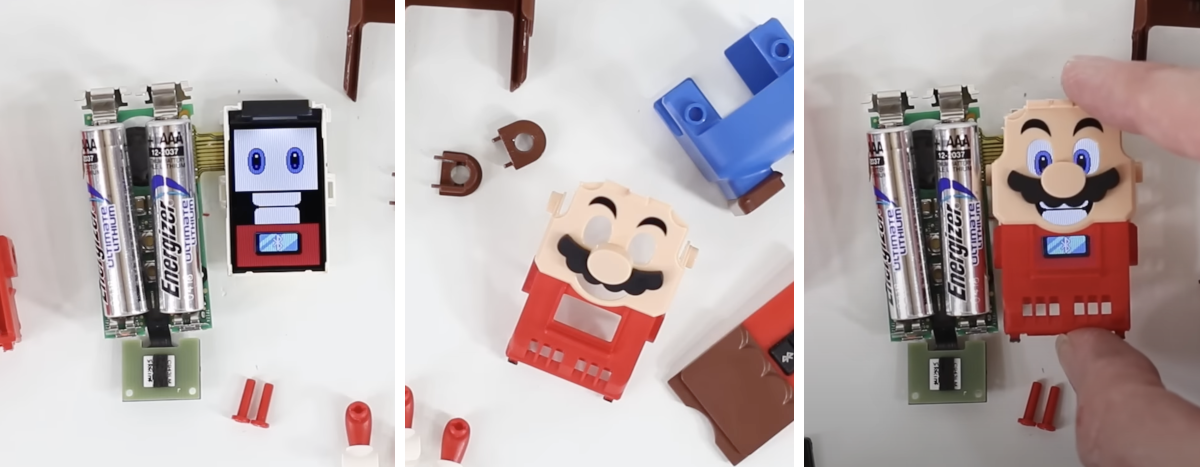
This final example, Chrome only, is using web-bluetooth (BLE) to talk LEGO Wireless Protocol to send LPF2 commands to, well, the LEGO Super Mario.
Example LPF2 command to send PWM power to port 0

# LPF2 Byte structure:
0: Command length (8 bytes)
|    1: Execute immediately (always 0 for single-hub setups)
|    |    2: Command code (Port Output)
|    |    |    3: Port
|    |    |    |    4: Mode
|    |    |    |    |    5: Sub-command (WriteDirectModeData)
|    |    |    |    |    |    6: Payload checksum (?)
|    |    |    |    |    |    |    7: Value (100, e.g. full speed)
|    |    |    |    |    |    |    |
0x08 0x00 0x81 0x00 0x11 0x51 0x00 0x64

# JS, as hex-encoded values
new Uint8Array([0x08, 0x00, 0x81, 0x00, 0x11, 0x51, 0x00, 0x64])

# JS, as decimal encoded values
new Uint8Array([8, 0, 129, 0, 17, 81, 0, 100])
Find your LEGO Mario, hit Connect, and see how the color underneath Mario colors the rect above.
let characteristic = undefined;

// https://lego.github.io/lego-ble-wireless-protocol-docs/index.html#lego-specific-gatt-service
// https://github.com/pybricks/technical-info/blob/master/assigned-numbers.md#ble-uuids
const LEGO_BLE_SERVICE = "00001623-1212-efde-1623-785feabcd123";
const LEGO_BLE_CHARACTER = "00001624-1212-efde-1623-785feabcd123";

async function connect() {
  // the bt dance:
  const device = await navigator.bluetooth.requestDevice({
    filters: [{ namePrefix: "LEGO Mario" }],
    optionalServices: [LEGO_BLE_SERVICE],
  });
  const server = await this.device.gatt.connect();
  const service = await this.server.getPrimaryService(LEGO_BLE_SERVICE);
  characteristic = await this.service.getCharacteristic(LEGO_BLE_CHARACTER);
  characteristic.startNotifications();
  characteristic.addEventListener("characteristicvaluechanged", onData);
  // subscribe to color
  await characteristic.writeValue(
    new Uint8Array([10, 0, 65, 1, 1, 5, 0, 0, 0, 1])
  );
}

// callback for characteristicvaluechanged
function onData(event) {
  const message = Array.from(new Uint8Array(event.target.value.buffer));
  const messageHeader = message.slice(0, 3);
  const messageBody = message.slice(3);
  const messageType = messageHeader[2];
  if (messageType != 69) return;

  const port = messageBody[0];

  if (port === 0) {
    // accelerometer
    // const motion = messageBody.slice(1);
    // console.log("motion:", motion);
  } else if (port === 1) {
    // color sensor
    const values = messageBody.slice(1); // [120, 124, 130]
    console.log("Color:", `rgb(${values.join(",")})`);
  } else if (port === 3) {
    // barcode reader
    const eventType = messageBody[1];
    const eventKey = messageBody[2];
    const eventValue = messageBody[3] + messageBody[4] * 256;
    console.log("coins:", eventType, eventKey, eventValue);
  }
}
Further reading:
MDN: Web Bluetooth API
Whats inside LEGO Mario? (Teardown)
END
So, after spending some time with Arrays, we have seen:
How to use them
const a = [1, 2, 3].concat(4, 5, 6).reverse(); // [6, 5, 4, 3, 2, 1]
const b = [...Array(10).keys()]; // [0, 1, 2, 3, 4, 5, 6, 7, 8, 9]
const c = a.shift() + b.pop(); // 6 + 9 = 15
What makes them fast
const slow = [1, undefined, "two", { value: 3 }, true]; // holes, mixed types
const fast = [1, 2, 3, 1]; // same type
const faster = new Uint8Array(1, 2, 3, 4); // narrow type
How JavaScript engines perform better with typed data and monomorphism
(and how TypeScript helps ensure that)
// [ JS ] -> [AST] -> [Sparkplug/Maglev/Turbofan]
How ArrayBuffers and a "data only" approach to i/o can let you
    // control periferals with web-bluetooth
    new Uint8Array([0x08, 0x00, 0x81, 0x00, 0x11, 0x51, 0x00, 0x64]); // LEGO LPF2 Motor command

    // squeak with web-audio
    new Float648Array([1065353216, 1065353224]); // Audio Waveform synth

    // doodle with canvas
    new Uint8ClampedArray() /* or */ createImageData(); // Batch update

    // send less junk over the wire
    // [1,"DD37Cf93aecA6Dc","Sheryl","Baxter"]
    // didnt include this example... http://localhost:3300/07-data.html
And with this peek into arrays you hopefully feel inspired to go write some performant code
JavaScript is not fast, browser are (if you help them)
thanks!